Run TrainerRoad+MyWhoosh Simultaneously on a Windows PC
If you have used TrainerRoad + Zwift at the same time (made available by Jesper Rosenlund Nielsen at Zwifthacks.com) and wondered if it was possible to do the same with TrainerRoad + MyWhoosh – good news, it is now possible.
Thank you to Jesper for making available the AutoHotKey v1.0 script along with the TR-Z-Move installer, I was able to take this and modify it to work with MyWhoosh along with some minor updates and improvements.
TR-MyWhoosh-Move v1.10 release:
- Works with MyWhoosh (instead of Zwift)
- Updated to use AutoHotKey v2.0
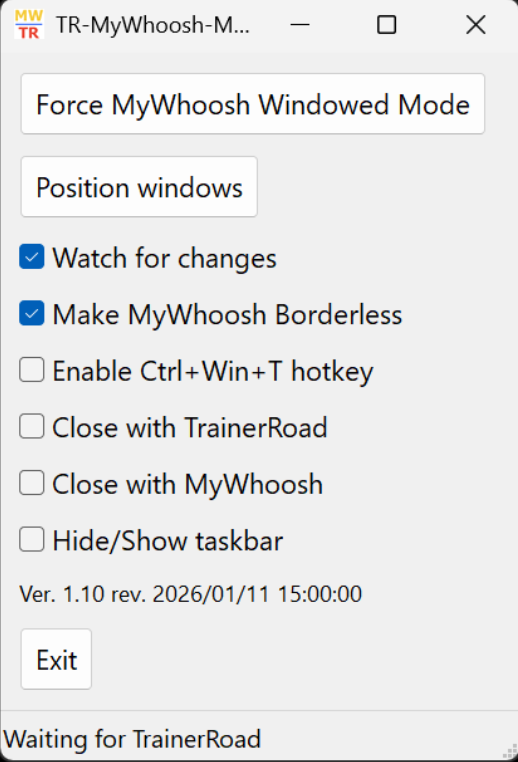
- Can force MyWhoosh into Windowed/Borderless Mode if not already enabled (can also use Alt+Enter)
- Saves settings on any change not just on exit
In the same style as Jesper (and I hope in line with the CC license), an installer is available containing:
- Compiled executable to run with AutoHotKey 2.0 (embedded with exe)
- The script source code (src folder) (if you run the script on its own, you will need AutoHotKey v2.00)
- Readme (basic usage notes)
- License (CreativeCommons 4.0)
Download from Google Drive: TR-MyWhoosh-Move_Setup_v1.10.exe
Basic / Suggested Usage
- Run MyWhoosh – (Optional: Press Alt+Enter to force Windowed mode)
- Run TrainerRoad – select workout and start, click bottom right icon to run in ‘minimal mode’
- Run TR-MyWhoosh-Move – If MyWhoosh is not in Windowed Mode – click ‘Force MyWhoosh Windowed’
Screenshots