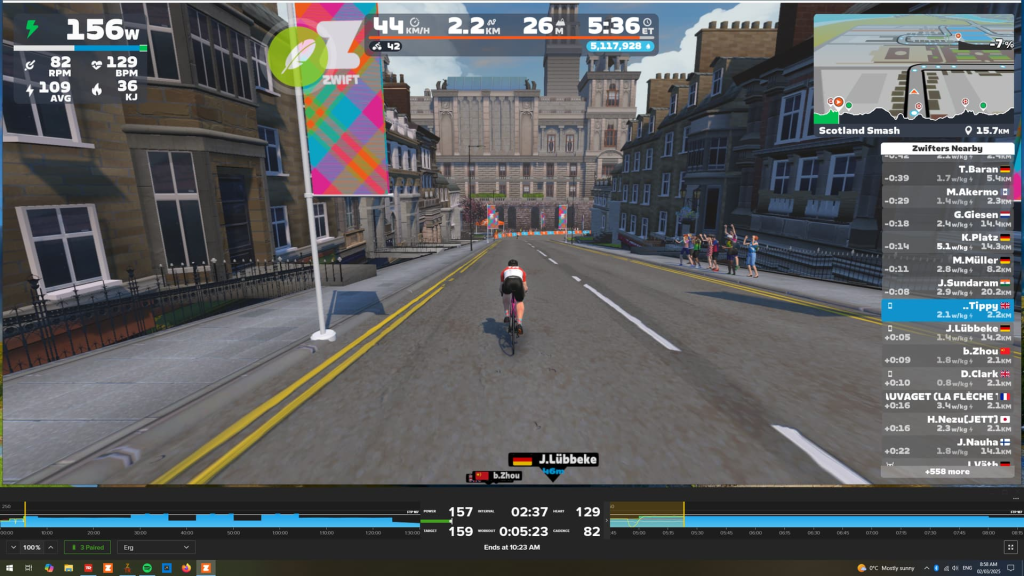
Run TrainerRoad+Zwift Simultaneously on a Windows PC
If you run Zwift on a Windows based PC and are also a user of TrainerRoad it is possible to run them both simultaneously on the same PC and achieve a sensible window layout (as per below screenshot).
Of course TrainerRoad now uploads workouts directly into Zwift, but it has been reported that the ERG control of Zwift itself is not as accurate/keen as that of TrainerRoad, and you might just prefer to have the workout ‘blue bars’ and all its data from TrainerRoad nicely compartmentalized at the bottom of the screen.
This task is made so much easier with the TR-Z-Move tool from Jesper Rosenlund Nielsen at Zwifthacks.com
Suggested Usage
- Load TrainerRoad, setup your sensors (Trainer Control, Power Measurement, Heart Rate, Cadence).
- Load the workout, then put TrainerRoad into Minimal view as below.
- Load Zwift, setup your sensors – but this time DO NOT ENABLE TRAINER CONTROL. Simply monitor power, heart rate, cadence etc if you wish to.
- Check Zwift is in Windowed Mode (Alt+Enter should also enable this)
- Run TR-Z-Move
- Click position windows, or watch for changes and the window layout should be set
Prerequisites
- Zwift
- TrainerRoad
- AutoHotKey (version 1.1, NOT version 2.0)